Affiliate disclosure: As an Amazon Associate I earn from qualifying purchases.
Research-based comparison · Updated October 25, 2026 · Manufacturer imagery credited below. We have not physically tested these products.
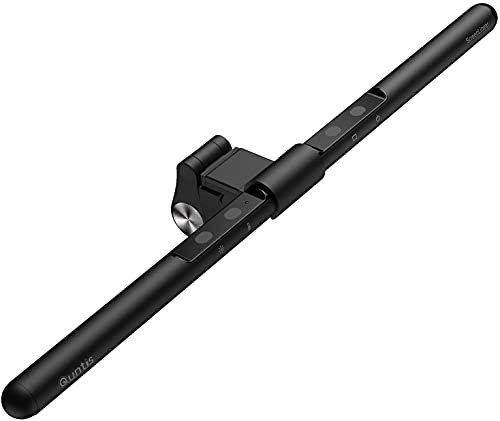
A monitor light bar should solve a small, specific problem: lighting the keyboard and nearby notebook without taking up space beside the screen. The Quntis Focus 40 and original BenQ ScreenBar Halo approach that job with different controls and mounting requirements. Before comparing their prices, check whether each actually fits your screen. Our home-office setup guide puts lighting in context with monitor position and available desk space.
Quick verdict: Shortlist the Quntis Focus 40 for a compatible flat monitor when straightforward desk lighting is enough. Consider the original BenQ ScreenBar Halo when its rear light and separate controller serve a real purpose, or when its published mounting range better fits your screen. Neither is automatically the right solution for lighting your face on video calls.
First, identify the exact models
This comparison covers the Quntis Focus 40 cm / ScreenLinear Basic, variant F40BK, and the original BenQ ScreenBar Halo. It does not transfer specifications from Quntis Pro+, Glow or other remote-control models. The Halo 2 is also a separate product. Similar listing names are not evidence that features are interchangeable.
The features that change the buying decision
| Decision | Quntis Focus 40 | Original BenQ ScreenBar Halo |
|---|---|---|
| Controls | Controls on the light bar | Separate wireless controller |
| Lighting arrangement | Desk-facing task light | Front and rear lighting modes |
| Monitor fit | Maker specifies flat-screen fit; excludes laptops and curved screens | Maker publishes separate flat and curved fit ranges |
| Useful scenario | Simple lighting on a supported flat display | Separate controls and rear illumination are useful |
| Main caution | Do not assume another Quntis model’s clamp or remote is included | Do not apply Halo 2 specifications to the original Halo |
This is a feature comparison rather than a brightness contest. We have not performed a controlled, side-by-side measurement of light distribution, glare, flicker or durability.
Why the Quntis is worth shortlisting
For a modest desk where the notebook stays directly before a flat display, a simple overhead task light can be enough. The useful question is whether the bar illuminates your actual work area while leaving your preferred webcam position available. Additional modes have little value if they will remain unused. For tight desks, see our small-space home-office guide before adding accessories.
Quntis describes automatic brightness adjustment and touch controls for the Focus 40 in its Focus 40 specifications and monitor-fit guidance. Importantly, that page excludes curved monitors and laptops. A general claim that “Quntis fits curved screens” is therefore not sufficient for this model.
What the original Halo adds
The Halo is more interesting if you want to adjust lighting without reaching above the display. A separate controller changes the daily interaction; the rear lighting also provides a different arrangement from a desk-only bar. Whether those additions justify the purchase depends on how often you will use them.
Check the monitor’s housing and mounting space using BenQ’s original Halo specifications. The company publishes separate thickness ranges for flat and curved screens. A supported diagonal size alone does not confirm that the clamp will work around your webcam, rear panel or unusual bezel. Our office monitor buying guide covers the other screen features worth checking.
Compare complete setups, not promotional prices
Check the delivered price, controller inclusion, required power source, shipping and returns for the exact listing. A search page can show several generations together. A lower advertised price means little if the product is a different model or lacks an accessory you expected.
Readers ordering outside the United States should also check local warranty handling. Do not assume an Amazon.com seller provides the same support as a regional authorised retailer. This guide intentionally avoids static price claims because offers and delivery options change.
Three reasons to choose a different solution
- Your main problem is dark video calls. A desk-facing light is not automatically aimed at your face. Try soft front lighting instead.
- Your work spreads across a wide table. A positionable lamp may reach paper and objects more effectively.
- Your screen cannot accept the clamp. Do not force a mount onto an incompatible housing.
For camera lighting, see our professional video-call setup guide. For a broader category decision, read ScreenBar Halo versus a desk lamp.
How to check the light in your own room
Keep the normal room lighting on and sit where you work. Place your keyboard, printed page and notebook in their usual positions. Adjust the bar and look for reflections from your seated position. Then move the monitor through the positions you actually use, checking cable slack and mount clearance.
Inspect webcam framing next. A light bar can share the screen’s top edge with other equipment only when the mounts permit it. Test a video call rather than judging the arrangement from a desk photograph. Avoid making a purchase decision on broad eye-health or productivity promises.
Pros, limitations and best fit
Quntis Focus 40
- Advantage: touch controls and automatic dimming without a separate controller on the desk.
- Limitation: this specific model excludes curved monitors and laptops.
- Best for: a supported flat display and a straightforward task-lighting requirement.
Original BenQ ScreenBar Halo
- Advantage: wireless controller and front/rear lighting options.
- Limitation: adds a controller to the desk and still requires checking the clamp and webcam clearance.
- Best for: buyers who will use the separate controls and rear lighting.
Frequently asked questions
Is the Quntis almost as good for much less money?
That claim needs defined measurements and current prices. Our research supports comparing fit and controls; it does not support a percentage-equivalence score.
Should I replace an original Halo with Halo 2?
This article does not test the Halo 2. Compare its own documentation against a specific problem your current light fails to solve before considering an upgrade.
Do I need a light bar if my room is already bright?
Possibly not. Check the task area first. If your page and keyboard are already comfortably illuminated without distracting reflections, the purchase may add little practical value.
Our buying recommendation
Begin with monitor compatibility. For a supported flat screen and a simple task-lighting need, the Focus 40 belongs on the shortlist. Consider the original Halo when its separate controller, rear lighting and documented mounting options match your workspace. If neither solves a clear problem, reposition your existing lighting before buying.
Sources and product documentation
- Quntis Focus 40 — model, touch controls and fit exclusions
- Original BenQ ScreenBar Halo — power and monitor-thickness specifications
- Original ScreenBar Halo — controls, lighting modes and included accessories
Featured product image: Quntis. Manufacturer photograph, not a FitOnear hands-on image.