Research-based buying guide · Checked October 31, 2026. We researched manufacturer documentation; we have not physically tested this product. Some shopping links may earn FitOnear a commission.
The MX Master 4 is a shortcut-focused office mouse for people who will configure and use its extra controls. Keep a working MX Master 3S if you cannot name a task the new controls improve.
Shopping for MX Master 4?
Search MX Master 4 on Amazon ↗
Opens Amazon.com search results, not a verified single listing. Match the exact model, package and seller before buying. Amazon prices may differ from the manufacturer price quoted here. As an Amazon Associate I earn from qualifying purchases.
Quick decision
Consider it if: You repeat desktop or creative-app actions and can install and configure the supported software.
Consider an alternative if: Your existing mouse already handles your work, the right-handed shape does not fit you, or software installation is restricted.
Exact model and price
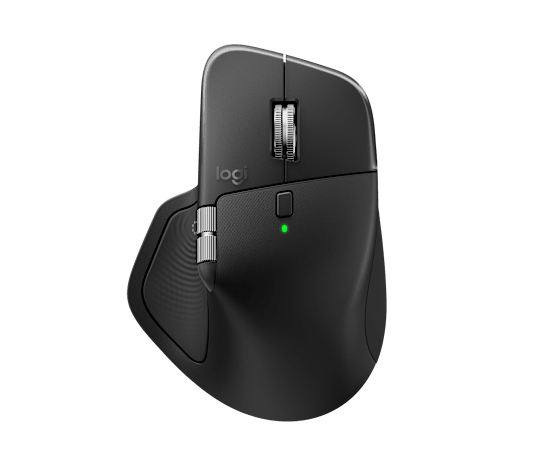
Logitech MX Master 4 Black office mouse, US reference 910-007560, with configurable haptic feedback and shortcut controls.
Variant: Standard MX Master 4, Black, US reference 910-007560. Mac and Business editions are separate packages.
USD 119.99. Manufacturer US listed price. Price checked October 31, 2026; US reference, before tax and shipping. Prices and selections can change. FitOnear does not sell this item.
Check exact model at Logitech US
Manufacturer specifications
| Core features | Haptic feedback, Actions Ring and MagSpeed scrolling |
|---|---|
| Sensor | Up to 8,000 DPI; manufacturer rating |
| Configuration | Logi Options+ on supported Windows/macOS systems |
| Edition check | Match standard, Mac or Business package and receiver contents |
Release status: Announced September 30, 2025. This is the original launch announcement, not a claim that every later colour or edition launched on that date.
Decide what a better mouse would actually change
A new mouse is easy to justify with a feature list and harder to justify with a working day. Write down three repeated actions: moving between spreadsheet sheets, opening a tool palette, or navigating a long document. Then check which of those actions can be assigned in your real applications. A control that saves a menu trip in one app may do nothing useful in another.
Haptics are feedback, not a productivity guarantee
Logitech describes tactile feedback for supported actions. Treat that as a different way to receive a signal, rather than proof that your work becomes faster. Start with one harmless action, such as switching views. Add more controls only when the first mapping becomes familiar. A large collection of shortcuts you cannot remember can add friction instead of removing it.
What a 3S owner should compare
The useful upgrade test is not whether the newer mouse has more features. It is whether one of those features changes a task you perform often enough to matter. Compare the MX Master 4 versus MX Master 3S guide, then check the 3S edition and package details. Keep a reliable existing mouse if the new control scheme solves no repeated problem.
Check the complete cost before ordering
A US-store price does not establish the delivered cost in another country. Match colour, edition, seller, receiver and warranty region. Check whether your employer allows Logi Options+, and whether the feature you want is supported in the app you use. Include any connection or software restriction in your decision before comparing a sale badge.
A sensible first-week evaluation
Keep your normal mouse available. Configure one or two navigation actions, work through a real document, and note any reach or grip issue. Check whether you can use the controls without looking down. This is a suggested evaluation routine, not a FitOnear test result. Your hand fit matters more than matching accessories.
Alternatives
The lowest additional cost is keeping your present mouse. A discounted MX Master 3S can make sense if its documented controls cover your needs. A differently shaped mouse can be the more useful comparison when fit is the problem; do not buy haptics as a substitute for checking comfort.
Common questions
Does it require special software?
Basic use and advanced configuration are different questions. Verify Logi Options+ and the supported integration for the feature you want.
Should every MX Master 3S owner upgrade?
No. Identify a repeated task that the new controls improve before replacing a functioning mouse.
How this guide was researched
We checked the exact model, package differences, listed price and documented limitations against the sources below. Buying advice is editorial analysis, not a measured performance score. Battery and specification figures are manufacturer ratings. No independent comfort, sound, recording or durability test is claimed.
Build around what you already own
Published October 31, 2026. Initial source and price verification; no hands-on test results.
Get the Pinterest pin & social images
Ready-made graphics for this article: Pinterest 1000 × 1500; Facebook/X 1200 × 630. Download an image and add your own caption, or use the share buttons to open a composer.