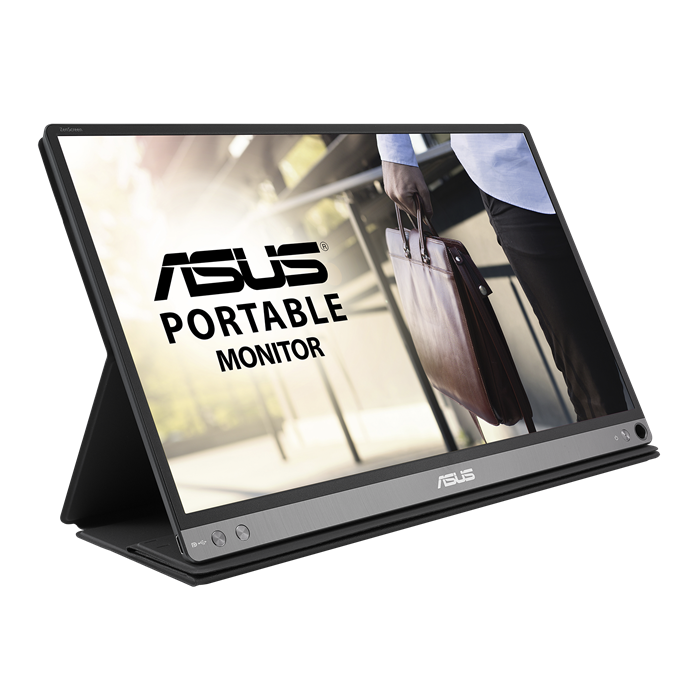
Retailer destination reviewed — 3 November 2026: The linked Amazon.com product page identifies ASUS ZenScreen MB16AC 15.6-inch USB-C monitor. The product identity was checked; price, stock, current seller and return terms were not verified. Confirm the selected variant and what is included before ordering.
How to use this recommendation
This research-based assessment prioritizes exact monitor suffix, connection method, driver installation restrictions and travel power arrangements. These are decision criteria, not a scored benchmark; no numerical weighting or hands-on performance result is claimed. Follow the sources and methodology below for the evidence and limitations.
Editorial background: Ghulam Mustafa Malik. See how we evaluate buying guides. Start with the home-office setup hub to place this purchase in your overall plan.
Research-based buying guide · Not physically tested by FitOnear
Sources reviewed: October 31, 2026. How this guide was prepared
ASUS ZenScreen MB16AC: model, price context and fit
ASUS ZenScreen MB16AC 15.6-inch Full HD portable monitor with hybrid USB connection paths.
Best fit: A second screen supports a recurring task in more than one location and you have a supported connection. Skip it if: You lack room for a second screen or cannot install software required for your connection path.
| Exact product | ASUS ZenScreen MB16AC |
|---|---|
| Selected variant | MB16AC, 15.6-inch viewable Full HD hybrid-signal USB monitor; not another MB16-series model. |
| Price context | No reliable current US price was visible on the checked manufacturer page. Confirm condition, accessories and exact MB16AC at the retailer. |
| Price type | Unverified; no current amount published |
| Currency / region | USD / United States reference market. No Saudi or Pakistan delivery/price claim. |
| Retailer | Amazon.com; exact MB16AC listing |
| Price last checked | October 31, 2026 — source-page review; not a live price feed. |
| Availability | Check the exact retailer listing and your destination; stock is not guaranteed. |
Check ASUS: MB16AC product and connection guidance. Price references are source snapshots, not FitOnear offers. Taxes, shipping, coupons and regional warranty can differ.
Key specifications that affect the choice
| Panel size | 15.6-inch viewable |
|---|---|
| Resolution | Full HD 1920 × 1080 |
| Manufacturer weight | 0.78 kg |
| Connection distinction | USB-C native path; USB-A path uses a driver |
Release and generation: Exact announcement and availability dates were not verified during this update. The manufacturer page remains available; that does not prove current retailer stock.
Affiliate disclosure: As an Amazon Associate I earn from qualifying purchases. Shopping links identify an external retailer or manufacturer; check the exact variant and regional delivery before buying.
Research-based editorial guidance; no hands-on test by FitOnear. Featured product image source: ASUS. Manufacturer documentation. ASUS ZenScreen MB16AC portable USB monitor. Images show product appearance, not measured performance.
Quick answer: Consider the ASUS ZenScreen MB16AC if you regularly need two visible work areas away from your main desk. Check the exact connection and driver requirements first. If you work in one permanent location, compare a conventional desktop monitor before choosing portability.
A second screen makes sense when you repeatedly compare two things: a document and a spreadsheet, a meeting and your notes, or instructions and the application you are learning. It is less persuasive when its main purpose is to keep distractions permanently visible.
This buying guide examines the MB16AC as a specific option. It is based on manufacturer information and practical setup considerations, not hands-on brightness or color testing.
What ASUS specifies
ASUS describes the ZenScreen MB16AC as a 15.6-inch Full HD portable monitor with a hybrid USB connection. Its official page lists a weight of 780g and explains that USB-A use requires an installed driver. Automatic rotation also has software and operating-system conditions; it should not be assumed on every device.
The MB16AC is one particular ZenScreen model. Similar names can refer to different inputs, stands and features. Match the complete model number in the listing to the documentation you read.
Define what goes on each screen
Before buying, finish this sentence: “I need to keep ___ visible while working on ___.” If the answer describes a task you perform several times a week, a second screen has a clear purpose.
For example, a project analyst might keep source figures visible while preparing a summary. A learner might display course instructions beside the software being studied. A writer might compare an outline with a draft. Those arrangements are useful because each screen has a role.
Try the same arrangement using your existing screen’s window controls. If it is already comfortable, you may not need more hardware. If it is cramped, the limitation is now specific enough to evaluate.
The connection check you should not skip
Look up your laptop’s exact ports and the monitor’s supported connection methods. If your plan depends on a driver, confirm that a suitable version exists for your operating system and that you have permission to install it.
This matters particularly on company laptops and older computers. A device can have the correct-shaped socket while still requiring a different connection method or software setup than you expected.
Do not buy a generic cable on appearance alone. Follow the manufacturer’s connection instructions and check the included accessories for the exact listing.
Portable display or desktop monitor?
| Choose based on… | Portable display | Desktop monitor |
|---|---|---|
| Where you work | Several locations | One main workstation |
| Setup routine | Frequent packing and unpacking | Equipment stays connected |
| Available surface | Must be checked at every location | Can be planned once |
| Priority | Mobility | A permanent working arrangement |
Neither category is inherently more productive. If you carry a second screen but rarely find space to use it, portability has not solved the real problem.
FitOnear’s office monitor buying guide helps frame the wider decision. Read it before committing to a travel-first design for a desk-first routine.
Measure the places where you actually work
Check the table in your spare room, the shared desk at work and the surface you use while travelling. Consider the laptop, second display, mouse, notebook and cables together.
Remember that a portable screen needs a stable position. Avoid planning around a narrow edge or a surface where the display will be easily knocked. Think about how you will pack it so pressure from other items does not bear directly on the panel.
A small workstation also benefits from restraint. FitOnear’s minimalist home-office guide offers a useful question: does this item earn its space through regular use?
Evaluate it with real documents
After setup, open the actual text and spreadsheets you use. Choose comfortable scaling and check that you can read the secondary screen without continually leaning toward it. Match the arrangement in your display settings to the physical arrangement on the desk.
Work for a normal session, then pack the display as you would for travel. Is the extra screen helpful enough to justify the additional item, cable and setup routine? That is the question a specification sheet cannot answer for you.
Frequently asked questions
Does USB-A use need a driver?
For the MB16AC, ASUS describes a driver-based USB-A connection. Check current driver support for your exact computer before buying.
Can I assume all ZenScreen models work the same way?
No. Read the documentation for the complete model number. Inputs, stands and software requirements can differ.
Is a portable monitor the best choice for a home office?
It depends on whether you need to move it. If it stays on the same desk, compare a conventional monitor’s size, stand and connections as well.
The buying decision
Check the complete model before ordering
- Possible fit: you regularly need a second screen in more than one location and have enough table space.
- Software check: ASUS describes driver-based USB-A operation. Verify current driver support and installation permission on your computer.
- Listing check: match MB16AC exactly, including condition and included accessories. Other ZenScreen names can describe different connections.
Before travel, test your normal documents, readable scaling, connection stability and the stand on a realistic surface. A successful first connection does not establish that the screen fits your working routine.
Affiliate disclosure: As an Amazon Associate I earn from qualifying purchases.
View ASUS ZenScreen MB16AC on Amazon ↗
Check the selected variant, seller, condition, delivery and return terms on Amazon.com. No live price or stock claim is made. This is a researched option, not a hands-on test result.
Use our portable-monitor power and connection checklist before choosing an additional cable or charger.
Choose the MB16AC only after confirming a recurring two-screen task, enough working space and a supported connection. If any of those are missing, solve that issue first. A portable monitor should simplify your working routine, not introduce a second setup problem wherever you go.
Reasons to buy, reasons to skip
Potential advantages for the stated use
- Portable format can support a repeated two-screen workflow.
- Hybrid connection design offers different supported paths.
Limitations
- USB-A operation requires driver support and installation permission.
- The family name ZenScreen alone does not identify the same model or inputs.
Alternatives before spending
Use the laptop alone when carrying less matters most. For a permanent desk, compare a conventional monitor. For another ZenScreen, match the full model code and connection requirements.
Sources and methodology
This is a research-based decision guide. FitOnear did not physically test this product. Manufacturer specifications are attributed claims, not measured results. The model and price context above were reviewed on October 31, 2026; price, software support and stock can change.
- ASUS: MB16AC product and connection guidance
- Amazon.com exact linked listing — verify selected variant, seller and delivery (affiliate link)
Frequently asked buying questions
What is the current price?
No reliable current US price was visible on the checked manufacturer page. Confirm condition, accessories and exact MB16AC at the retailer. Check the linked retailer for your final total.
Was it tested by FitOnear?
No. This guide uses documented specifications and workflow analysis; it contains no FitOnear benchmark, comfort score or star rating.
How do I avoid ordering a different variant?
Match this identification before purchase: MB16AC, 15.6-inch viewable Full HD hybrid-signal USB monitor; not another MB16-series model.
Update log
: added explicit variant and price context, refreshed primary sources, separated research from testing, and clarified buying limits. Unknown release dates and prices remain labelled as unknown.
Next: use the Home Office Compatibility Checklist, compare the Home Office Setup Guide, or browse Gear Reviews.
Get the Pinterest pin & social images
Ready-made graphics for this article: Pinterest 1000 × 1500; Facebook/X 1200 × 630. Download an image and add your own caption, or use the share buttons to open a composer.

