Retailer destination reviewed — 3 November 2026: The linked Amazon.com product page identifies Anker 555 8-in-1 hub, model A8383. The product identity was checked; price, stock, current seller and return terms were not verified. Confirm the selected variant and what is included before ordering.
How to use this recommendation
This research-based assessment prioritizes host-port video capability, display path, power budget and the exact hub model. These are decision criteria, not a scored benchmark; no numerical weighting or hands-on performance result is claimed. Follow the sources and methodology below for the evidence and limitations.
Editorial background: Ghulam Mustafa Malik. See how we evaluate buying guides. Start with the home-office setup hub to place this purchase in your overall plan.
Research-based buying guide · Not physically tested by FitOnear
Sources reviewed: November 1, 2026. How this guide was prepared
Anker 555 USB-C Hub (8-in-1): model, price context and fit
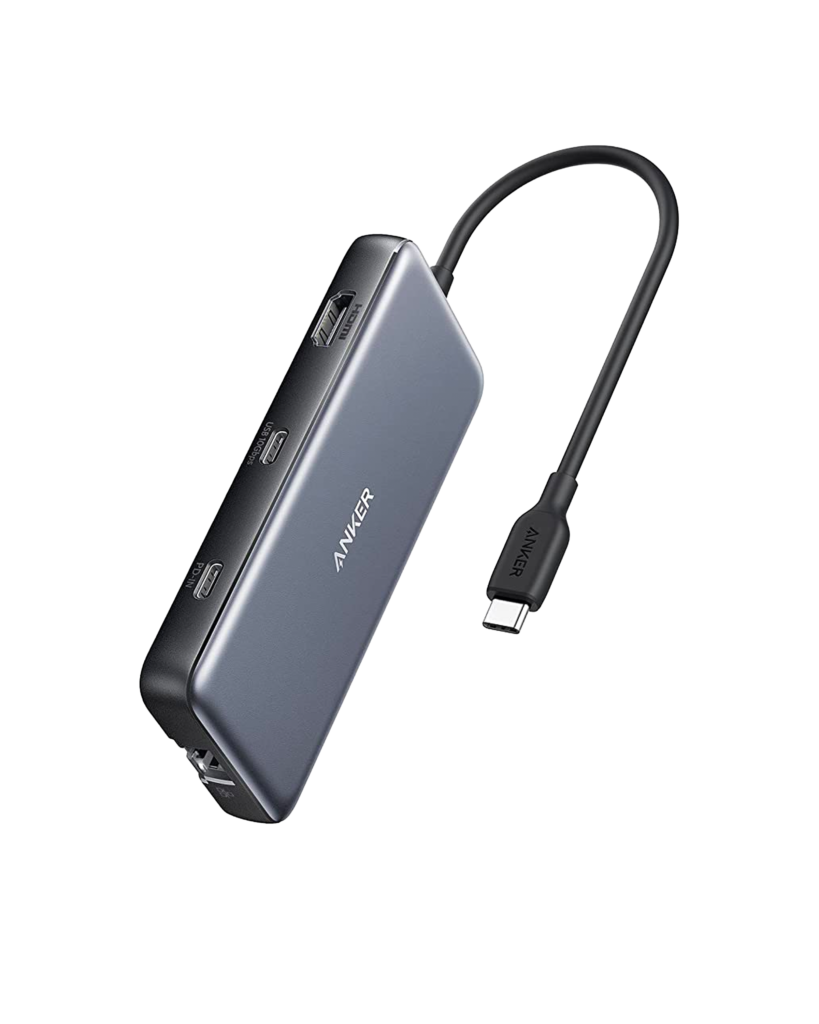
Anker 555 A8383 8-in-1 USB-C hub with HDMI output, data ports, Ethernet and card slots.
Best fit: Your compatible host needs one HDMI display plus the documented data, card and Ethernet connections. Skip it if: You need video from the hub’s USB-C data port or a display arrangement not supported by your host.
| Exact product | Anker 555 USB-C Hub (8-in-1) |
|---|---|
| Selected variant | A8383, 8-in-1, Black; do not substitute another Anker hub based on appearance. |
| Price context | Observed manufacturer listed price: USD 49.99 for Black A8383. Excludes optional membership, bulk discounts, shipping and taxes; Amazon pricing is separate. |
| Price type | Dated manufacturer listed-price snapshot |
| Currency / region | USD / United States reference market. No Saudi or Pakistan delivery/price claim. |
| Retailer | Anker US for the price reference; Amazon.com separately linked |
| Price last checked | November 1, 2026 — source-page review; not a live price feed. |
| Availability | Check the exact retailer listing and your destination; stock is not guaranteed. |
Check Anker US: A8383 product specifications. Price references are source snapshots, not FitOnear offers. Taxes, shipping, coupons and regional warranty can differ.
Key specifications that affect the choice
| HDMI | Up to 4K at 60 Hz, subject to host support |
|---|---|
| PD input / laptop output | Up to 100 W input / 85 W to laptop |
| Data ports | Two USB-A and one USB-C; up to 10 Gbps |
| Network / cards | 1 Gbps Ethernet; SD and microSD |
Release and generation: Announcement and first-sale dates were not verified from the checked manufacturer page; no release date is inferred from an Amazon listing.
Affiliate disclosure: As an Amazon Associate I earn from qualifying purchases. Shopping buttons open Amazon.com product pages or searches; check the exact item and regional delivery before buying.
A hub should fit the computer and the wider desk setup. Plan the connections in our Home Office hub.
Research-based editorial guidance; no hands-on test by FitOnear. Featured product image source: Anker. Manufacturer documentation. Anker 555 A8383 8-in-1 USB-C hub with HDMI, USB and card ports. Images show product appearance, not measured performance.
Quick answer: The Anker 555 USB-C Hub is worth considering when a compatible laptop needs one HDMI display plus everyday data and network connections. Do not buy it merely because your computer has a USB-C socket. Check the computer’s video capability, charging requirements and the exact ports you need.
A hub purchase often goes wrong in a small but expensive way: the connector fits, yet the intended setup does not work. The most useful shopping list therefore starts with your laptop model and peripherals, not the largest “in-one” number on the box.
This guide focuses on the Anker 555, model A8383. Other Anker hubs can look similar while offering different connections. It is a research-based guide rather than a hands-on speed test.
The important specifications
Anker’s official A8383 product page lists one HDMI output rated up to 4K at 60Hz, USB data ports, Gigabit Ethernet and SD/microSD slots. It specifies up to 100W power input with up to 85W available to the laptop, reserving power for hub operation. A charger is not included.
Anker also states that the hub’s USB-C data port does not provide video output. That distinction is essential if your plan is to connect a USB-C monitor through that port.
Make a connection map before ordering
Write down every device you intend to connect and what it needs. A keyboard is a data device. A display needs an appropriate video path. A laptop charger needs a supported charging path. Similar-looking sockets do not make those roles interchangeable.
| Device or task | Detail to verify |
|---|---|
| External monitor | Laptop video support, HDMI input and desired mode |
| Laptop charging | Laptop requirement, charger output and suitable cable |
| External SSD | Data connection and the slowest link in the chain |
| Wired network | An accessible network connection and Ethernet cable |
| Memory card | Card format and the slot you actually need |
If your plan involves two external monitors, stop and compare products designed for that requirement. A hub with one HDMI connector should not be purchased on the assumption that it becomes a dual-monitor dock with a simple extra adapter.
Understand the charging budget
The wattage printed in a hub’s title may describe input rather than power delivered to your laptop. Compare the laptop’s normal charger with the hub’s stated output, then account for the charger and cable you will use.
A setup can appear to charge during light work yet behave differently under a demanding workload. When you receive the hub, test it with the applications and peripherals you normally use. Check the computer’s charging indication rather than assuming the presence of a power cable proves the setup is adequate.
If you already own a suitable charger, include that in your cost comparison. If not, compare the whole setup’s cost rather than the hub alone.
A USB-C port is not a compatibility guarantee
Find your computer’s exact model and port specifications on its manufacturer’s support site. An older laptop with a different port type should not be assumed compatible simply because an adapter exists.
For a display, check the required video support and desired resolution and refresh rate across the computer, hub, cable and screen. A claim on one component does not establish the performance of the complete chain.
FitOnear’s office monitor buying guide is useful if you are also choosing the display. Decide on the full connection path before buying either accessory.
Hub or desktop dock?
A compact hub suits someone who needs a small set of extra connections and can live with the resulting cable arrangement. A desktop dock becomes more interesting when you routinely connect many peripherals or need a particular multi-display configuration.
Neither category wins automatically. Count the cables that will connect each morning, consider where the equipment will sit and compare the setup you actually need. Extra ports have little value if they serve devices you do not own.
For desks with limited room, combine that planning with FitOnear’s small-space setup guide.
Test each function separately
Start with the hub and one low-complexity peripheral. Add the monitor, then network, then storage, then charging. If something stops behaving as expected, disconnect the last addition and check its requirements.
Finally, test the complete setup through a restart and a sleep/wake cycle. Keep the packaging until you have checked the actual combination you bought the hub to support.
Frequently asked questions
Can the USB-C data port drive my monitor?
Anker states that this model’s USB-C data port does not support video output. Plan around the specified HDMI output, or choose different hardware for your display requirements.
Does a 100W input mean my laptop receives 100W?
No. For the A8383, Anker specifies up to 85W to the laptop after the hub’s power allocation. Your charger and cable must also meet the setup’s requirements.
Is this automatically compatible with every MacBook?
No. Check the exact MacBook model, ports, display support and charging needs. A broad “MacBook compatible” description is not a substitute for that check.
The buying decision
Check your setup, then compare the exact product
- Possible fit: a compatible host, one HDMI display and the documented data/network ports.
- Choose another solution: your monitor needs video from the hub’s USB-C data socket, or your intended display arrangement exceeds this hub’s capabilities.
- Before ordering: match model A8383, your laptop’s port specification, monitor input, charger and required cables.
Affiliate disclosure: As an Amazon Associate I earn from qualifying purchases.
This opens a specific Amazon.com listing. Check the selected model, seller, delivery, returns and total cost for your location. No live price or availability is claimed.
Already own a hub with a blank screen? Try our USB-C monitor troubleshooting sequence before replacing it.
Shortlist the Anker 555 if its documented ports match a specific setup. Skip it if you need USB-C video output from the hub or a different display arrangement. The right hub is the one whose connection map matches yours without guesswork.
Reasons to buy, reasons to skip
Potential advantages for the stated use
- Combines a single HDMI output and common desk connections.
- Pass-through charging can reduce separate desk connections with a suitable charger.
Limitations
- USB-C data port is not a monitor video output.
- Headline input wattage is not the wattage delivered to the laptop.
Alternatives before spending
Keep a functioning hub. Use a direct video cable for a simple single-screen connection, or compare a dock only after checking your host’s display allowance.
Sources and methodology
This is a research-based decision guide. FitOnear did not physically test this product. Manufacturer specifications are attributed claims, not measured results. The model and price context above were reviewed on October 31, 2026; price, software support and stock can change.
- Anker US: A8383 product specifications
- Amazon.com exact linked listing — verify selected variant, seller and delivery (affiliate link)
Frequently asked buying questions
What is the current price?
Observed manufacturer listed price: USD 49.99 for Black A8383. Excludes optional membership, bulk discounts, shipping and taxes; Amazon pricing is separate. Check the linked retailer for your final total.
Was it tested by FitOnear?
No. This guide uses documented specifications and workflow analysis; it contains no FitOnear benchmark, comfort score or star rating.
How do I avoid ordering a different variant?
Match this identification before purchase: A8383, 8-in-1, Black; do not substitute another Anker hub based on appearance.
Update log
: added explicit variant and price context, refreshed primary sources, separated research from testing, and clarified buying limits. Unknown release dates and prices remain labelled as unknown.
Next: use the Home Office Compatibility Checklist, compare the Home Office Setup Guide, or browse Gear Reviews.
Need more than a hub? If you want to charge a larger laptop and run two monitors from one cable, compare Thunderbolt and DisplayLink options in our best docking station guide.
Get the Pinterest pin & social images
Ready-made graphics for this article: Pinterest 1000 × 1500; Facebook/X 1200 × 630. Download an image and add your own caption, or use the share buttons to open a composer.