Retailer destination reviewed — 3 November 2026: The linked Amazon.com product page identifies Jabra Evolve2 40 SE wired stereo, USB-A, Microsoft Teams, Black. The product identity was checked; price, stock, current seller and return terms were not verified. Confirm the selected variant and what is included before ordering.
How to use this recommendation
This research-based assessment prioritizes connector and platform variant, seated-call requirements, mute behavior and return-window comfort checks. These are decision criteria, not a scored benchmark; no numerical weighting or hands-on performance result is claimed. Follow the sources and methodology below for the evidence and limitations.
Editorial background: Ghulam Mustafa Malik. See how we evaluate buying guides. Start with the home-office setup hub to place this purchase in your overall plan.
Research-based buying guide · Not physically tested by FitOnear
Sources reviewed: November 1, 2026. How this guide was prepared
Jabra Evolve2 40 SE: model, price context and fit
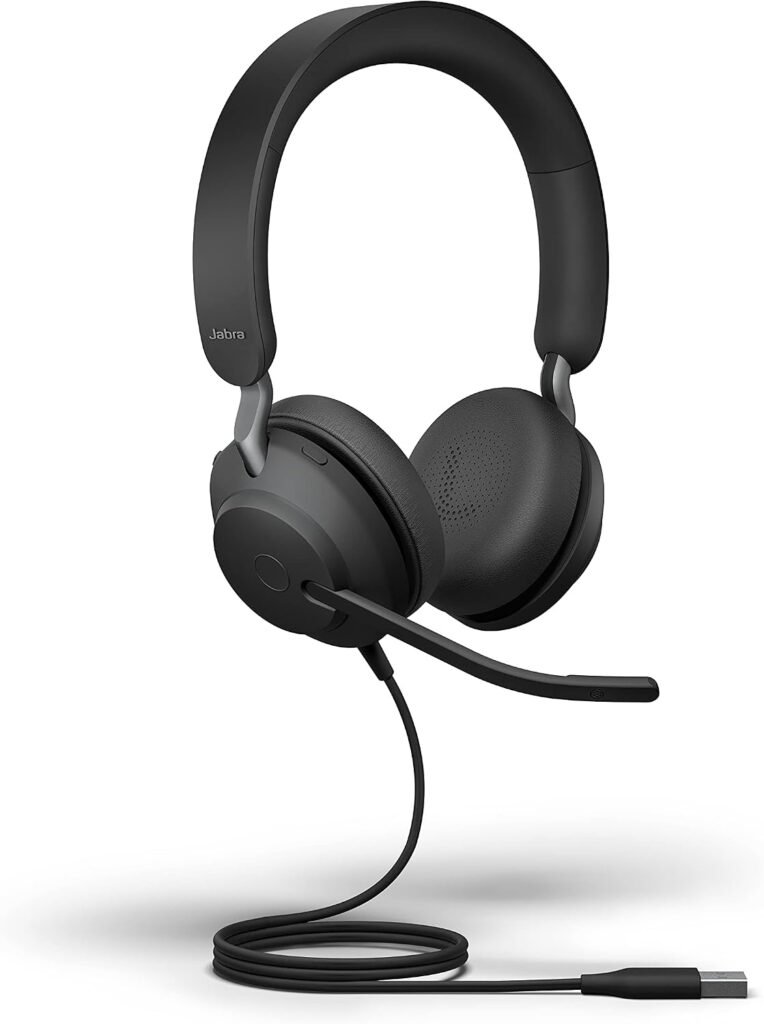
Jabra Evolve2 40 SE wired USB-A Microsoft Teams stereo headset, black, SKU 24189-999-999.
Best fit: You take seated computer calls and want a wired boom microphone with visible busy status. Skip it if: You need to walk around during calls, or need a USB-C or mono version instead.
| Exact product | Jabra Evolve2 40 SE |
|---|---|
| Selected variant | USB-A, Microsoft Teams stereo, black; SKU 24189-999-999 |
| Price context | Staples US displayed USD 177.39 for SKU 24189-999-999, with the page marked out of stock. This is a dated retailer-listed price, not a claim that it can currently be ordered. |
| Price type | Dated Staples US listed-price snapshot; retailer marked out of stock |
| Currency / region | USD / United States reference market. No Saudi or Pakistan delivery/price claim. |
| Retailer | Staples US for the USD 177.39 price reference; Amazon.com exact-model link separately provided |
| Price last checked | November 1, 2026 — source-page review; not a live price feed. |
| Availability | Check the exact retailer listing and your destination; stock is not guaranteed. |
Check Jabra SE technical sheet (exact SKU). Price references are source snapshots, not FitOnear offers. Taxes, shipping, coupons and regional warranty can differ.
Key specifications that affect the choice
| Connection | Wired USB-A for the selected SKU |
|---|---|
| Wearing style | Stereo, on-ear |
| Microphones | 3 digital MEMS |
| Variant warning | UC, Teams, USB-A, USB-C and mono SKUs differ |
Release and generation: Exact commercial announcement and on-sale dates were not verified; the dated technical sheet is not treated as a release announcement.
Additional retailer check, November 1, 2026: Staples: exact 24189-999-999 USB-A Teams stereo headset displayed USD 177.39 and out-of-stock status. Taxes, shipping and regional supply are separate. Amazon availability and price can differ.
Affiliate disclosure: As an Amazon Associate I earn from qualifying purchases. Shopping links identify an external retailer or manufacturer; check the exact variant and regional delivery before buying.
Research-based editorial guidance; no hands-on test by FitOnear. Featured product image source: Amazon listing for Jabra Evolve2 40 SE USB-A Teams stereo. Manufacturer documentation. Jabra Evolve2 40 SE USB-A Microsoft Teams stereo headset, black. Images show product appearance, not measured performance.
Quick answer: The Jabra Evolve2 40 SE belongs on your shortlist if you spend much of your workday on computer calls and prefer a wired headset. Choose the connector and meeting-platform variant carefully. If you need to walk around while speaking, a wireless headset is a more suitable category.
A customer should not have to ask you to repeat a reference number three times. For customer support, consulting and remote teamwork, a headset purchase starts with clear communication and predictable controls. Music features are secondary when your main job is answering questions accurately.
This guide focuses on whether this headset fits your working day. It is a research-based buying guide, not a claim of hands-on testing or a promise that one microphone can eliminate every background sound.
What the Evolve2 40 SE offers
Jabra’s official Evolve2 40 SE technical sheet describes a boom microphone system, a visible busy light and a Microsoft Teams-certified variant. These are useful features to compare when calls occupy a large share of your day. Check the exact SE listing and connector before ordering; a product-family name alone does not identify every configuration.
Wired or wireless: decide this first
A wired headset keeps your setup straightforward: connect it to a suitable computer port and select it in your calling application. You do not have a headset battery to recharge. The compromise is that the cable sets the boundary of your movement.
Think about your last five meetings. Were you seated and taking notes, or walking to a whiteboard and reaching for documents across the room? Buy for that pattern. Paying for a desk-focused product and then trying to use it like a mobile headset is an avoidable mismatch.
| Your work pattern | What to prioritize |
|---|---|
| Customer calls at one desk | Boom placement, mute controls and connector fit |
| Frequent movement during calls | A wireless model with suitable range |
| Shared room | Microphone performance and personal comfort |
| Occasional short meetings | Whether your existing headset already works |
The connector mistake to avoid
Look at the port you will actually use. That might be your laptop, a dock or a monitor hub. Write down whether it is USB-A or USB-C, then compare that with the exact item being sold.
Do not assume that an adapter is included because the photographs show several accessories. Read the package contents. On an employer-managed machine, also check which peripherals and management software your IT team supports. A headset that fits the port can still be the wrong choice for your organization’s approved setup.
For a broader look at your desk arrangement, read FitOnear’s small-space home office guide.
Noise reduction: separate two different questions
Ask both “Will I hear the caller clearly?” and “Will the caller hear me clearly?” They are different problems. Ear cushions influence the sound reaching your ears. Microphone placement and processing influence the sound sent to the other person.
Avoid interpreting a general noise-cancellation label as a guarantee that a nearby conversation will disappear. Your room, speaking distance and meeting application matter. If privacy is essential, moving to a more suitable space remains part of the solution.
Before replacing your current headset, record yourself saying a realistic customer response while someone types nearby. Listen to the recording. That gives you a clearer purchase goal than a long feature list.
Comfort matters more than a quick fitting
Plan to evaluate fit during a normal work session while the seller’s return window remains open. Wear your usual glasses. Check whether you keep adjusting the earcups, whether the cable catches on the desk and whether you can reach mute without looking down.
Comfort is personal, so this guide does not label any headset universally comfortable. A design that suits one colleague can be distracting for another. Keep the packaging until you have completed your own assessment.
A practical setup routine
- Connect the headset and select it as both microphone and speaker in your meeting application.
- Make a short test recording in the room where you normally work.
- Adjust microphone position using the manufacturer’s instructions.
- Check how the physical mute control interacts with the application’s mute indicator.
- Run a short call with a colleague before an important customer meeting.
If your team also records meeting outcomes, combine good audio with these AI meeting-note practices. Better equipment will not correct a missing decision or an inaccurate action owner.
Frequently asked questions
Should I buy the Teams version?
If Microsoft Teams is your organization’s standard, check the Teams-certified variant against your IT team’s guidance. Do not assume every similarly named listing has the same platform controls.
Is this a replacement for a wireless headset?
Only if you are happy to work within a cable’s reach. If freedom of movement is your main requirement, choose a wireless category first and compare products within it.
Will it make every call sound professional?
No headset can guarantee that. A suitable room, sensible microphone placement, a stable connection and clear speaking habits all contribute.
Who should buy it?
Match the variant to your desk
- Check the connector: the linked listing is labelled USB-A. Match it to the computer or dock port you will actually use.
- Check the platform: the linked listing identifies the Microsoft Teams version. Confirm the selected variant against your workplace requirements.
- Check your work pattern: a wired headset is a candidate for seated calls; choose a different category if walking during calls is essential.
Do not interpret noise isolation at your ears as a guarantee that the microphone removes all nearby conversations. Test a short call in your normal room and check the physical mute control against your app.
Affiliate disclosure: As an Amazon Associate I earn from qualifying purchases.
View Jabra Evolve2 40 SE on Amazon ↗
Check the selected variant, seller, condition, delivery and return terms on Amazon.com. No live price or stock claim is made. This is a researched option, not a hands-on test result.
Compare the broader choice in our USB headset versus desktop microphone guide.
Shortlist the Evolve2 40 SE if you want a desk-based calling setup and can identify the correct connector and platform variant. Skip it if mobility is essential or your current headset already delivers clear, comfortable calls. The worthwhile upgrade is the one that removes a specific problem from your working day.
Reasons to buy, reasons to skip
Potential advantages for the stated use
- No headset battery to charge during desk calls.
- Physical boom and busy indication fit a call-heavy workflow.
Limitations
- Cable reach limits movement.
- Fit and microphone performance in your room have not been tested by FitOnear.
Alternatives before spending
Keep a working headset for the lowest additional cost; compare a wireless headset if movement is essential. The older Evolve2 40 has separate documentation and must not be substituted for the SE.
Sources and methodology
This is a research-based decision guide. FitOnear did not physically test this product. Manufacturer specifications are attributed claims, not measured results. The model and price context above were reviewed on October 31, 2026; price, software support and stock can change.
- Jabra SE technical sheet (exact SKU)
- Amazon.com exact linked listing — verify selected variant, seller and delivery (affiliate link)
Frequently asked buying questions
What is the current price?
A current US selling price could not be independently confirmed. Ask the retailer for the selected SKU; no numeric offer is published. Check the linked retailer for your final total.
Was it tested by FitOnear?
No. This guide uses documented specifications and workflow analysis; it contains no FitOnear benchmark, comfort score or star rating.
How do I avoid ordering a different variant?
Match this identification before purchase: USB-A, Microsoft Teams stereo, black; SKU 24189-999-999
Update log
: added explicit variant and price context, refreshed primary sources, separated research from testing, and clarified buying limits. Unknown release dates and prices remain labelled as unknown.
Next: use the Home Office Compatibility Checklist, compare the Home Office Setup Guide, or browse Gear Reviews.
Get the Pinterest pin & social images
Ready-made graphics for this article: Pinterest 1000 × 1500; Facebook/X 1200 × 630. Download an image and add your own caption, or use the share buttons to open a composer.